Support
How to contact Notch, what we can help with, and how to manage or delete your account.
How to contact us
For all support enquiries, please email support@notch.win. We aim to acknowledge every message within one business day and to provide a substantive response as soon as reasonably practicable.
What to include in your message
To help us assist you faster, please include the following information where applicable:
- The email address or phone number associated with your Notch account
- A clear description of the issue, including the steps you took before encountering it
- The date and approximate time the issue occurred (with your time zone)
- The device and operating system you were using (for example, iPhone 15 / iOS 18, or Chrome on macOS)
- Any relevant transaction identifiers, wallet addresses, or order references
- Screenshots or screen recordings illustrating the issue, where possible
What we can help with
The Notch support team can assist with, among other things:
- Account access, verification, and security
- Deposits, withdrawals, and balance enquiries
- Questions about trading on the Perp DEX Protocols accessible through Notch
- Notch Points (NP), referrals, and rewards
- Bug reports and feature requests
- Questions about our Privacy Policy or Terms of Use
What we cannot help with
Notch does not provide investment, legal, tax, or financial advice. We are also unable to reverse on-chain transactions once they have been confirmed by the relevant blockchain network. If you believe you have been the victim of fraud or a scam, please contact us immediately so that we can take any action available to us and, where appropriate, escalate the matter to law enforcement.
Security reports
If you have identified a potential security vulnerability affecting Notch, please report it to support@notch.win with the subject line "Security Report". Please do not publicly disclose the vulnerability until we have had a reasonable opportunity to investigate and remediate it.
Operating hours
Notch support operates remotely across multiple time zones. While we monitor support enquiries continuously, response times may be longer outside standard business hours (09:00 – 18:00 UTC, Monday to Friday) and on public holidays.
Delete your Notch account
You can delete your account yourself in the Notch app, or ask us to delete it by email.
Delete in the app
-
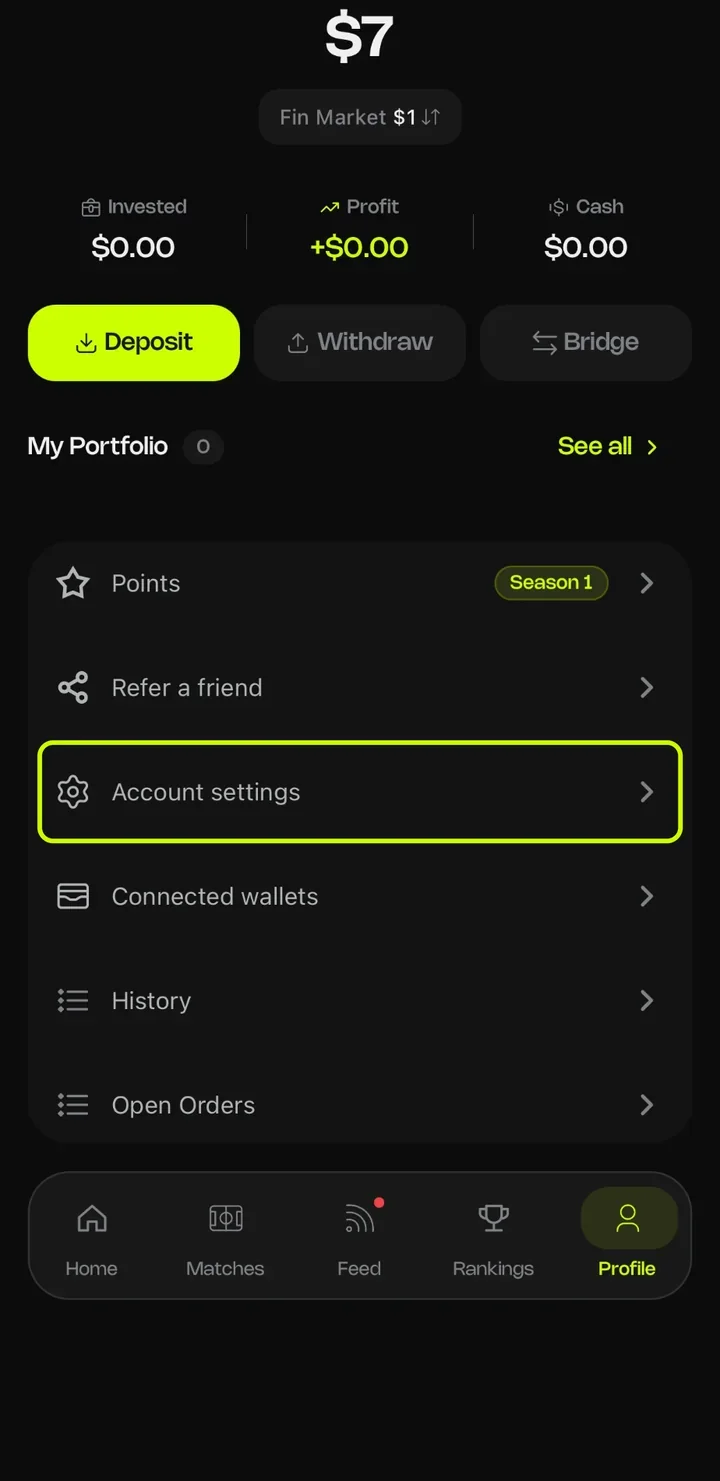
1Open the Profile tab and tap Account settings.
-
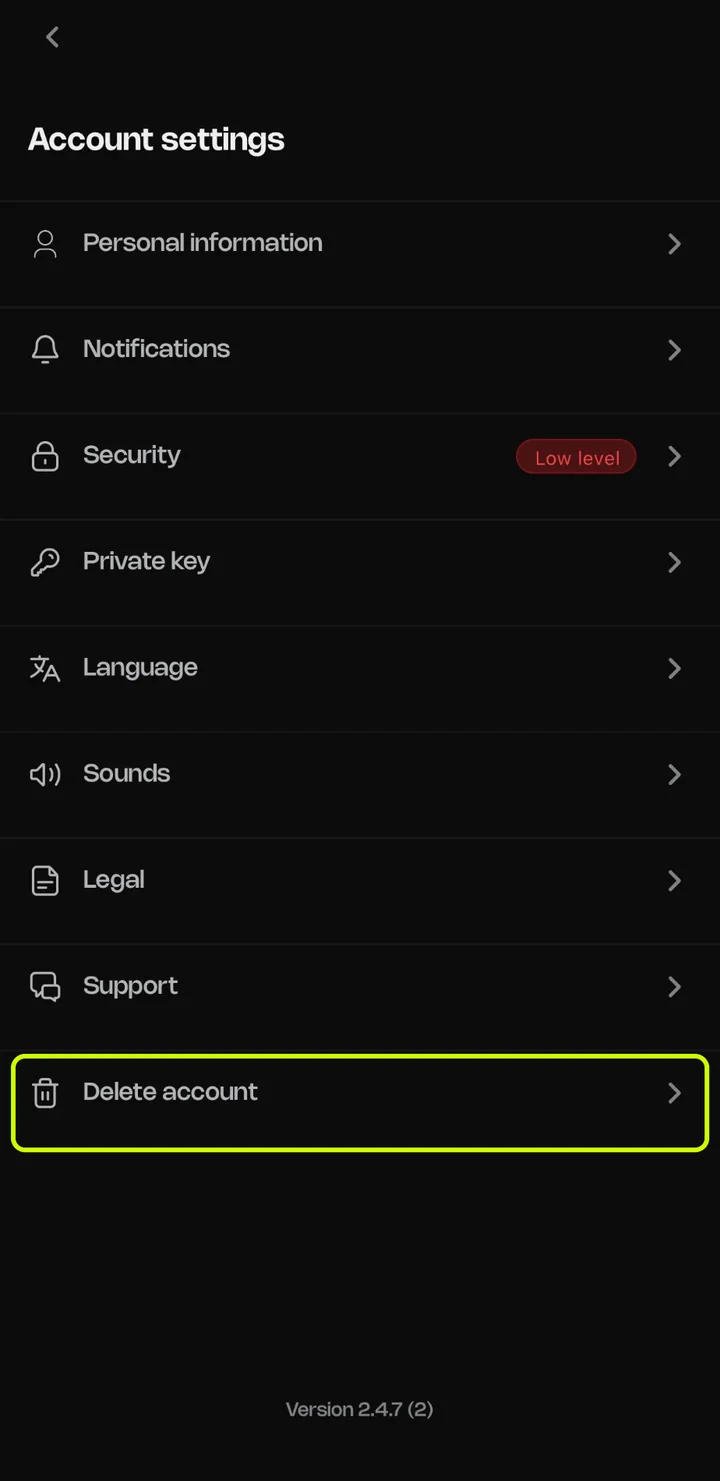
2Scroll to the bottom and tap Delete account.
-
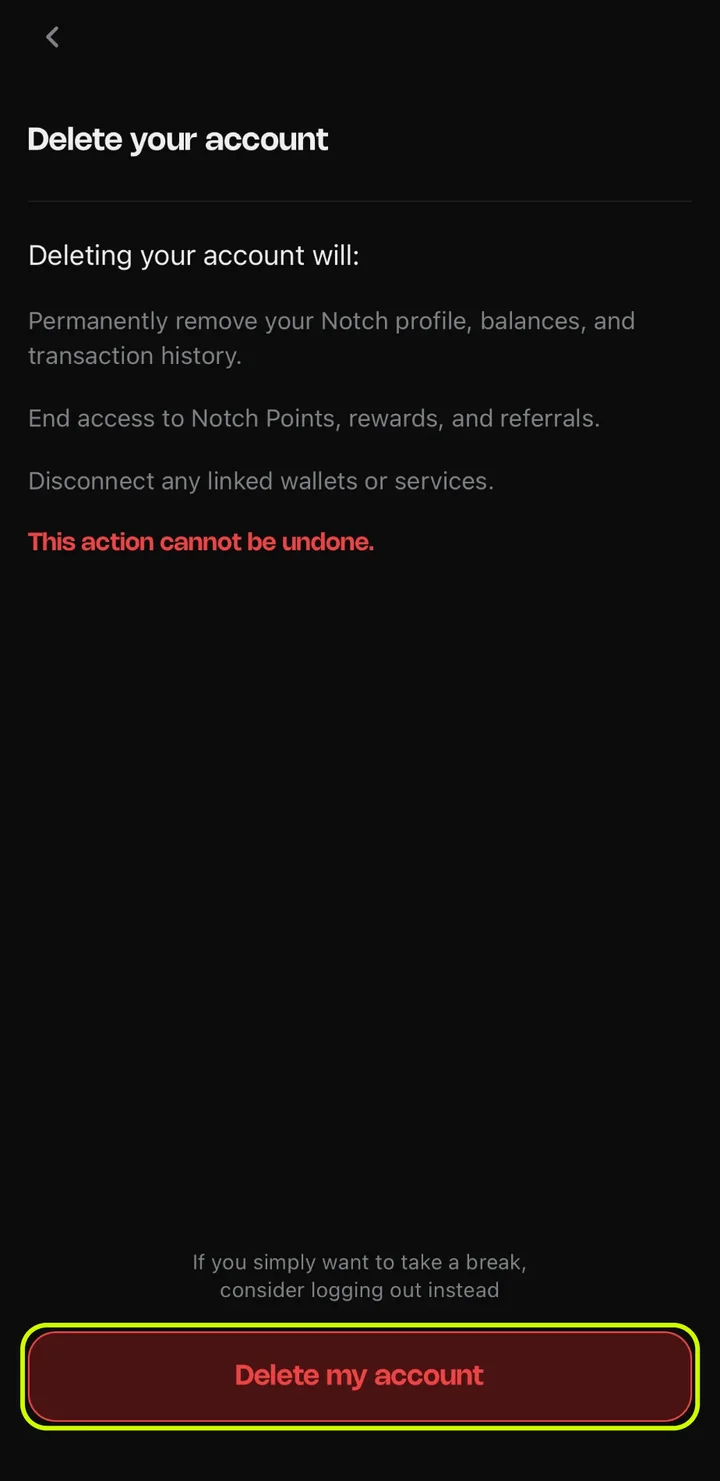
3Review what will be removed, then tap Delete my account. This can't be undone.
Delete by email
If you can't access the app, submit the form below or email support@notch.win from the email address linked to your account, with the subject line "Delete Account." We process deletion requests within 30 days.
What gets deleted
After your account is closed, we delete or anonymize your account data within 90 days. This includes your phone number, email address, Google account, social media handles, device identifiers, and your Notch Points and rewards data.
What we keep for a limited time
Some records must be kept after your account is closed, as set out in our Privacy Policy:
- Records we need to meet legal obligations, resolve disputes, or prevent fraud: up to 5 years
- Referral and affiliate records used for commission accounting and disputes: up to 5 years
- Your support emails and other correspondence with us: up to 3 years after our last contact
What we cannot delete
Notch is a non-custodial application. The following data is not stored by Notch and cannot be deleted by us:
- Your blockchain wallet, private keys, and onchain transaction history
- Any cryptocurrency held in your self-custodial wallet
- Any onchain positions or trade history on Tail.trade, Hyperliquid, or other protocols
Export your private key
Your Notch wallet is self-custodial. Exporting its private key lets you use the same wallet, and the funds in it, from another wallet app such as MetaMask. Do this before you delete your Notch account if you want to keep access to your funds.
-
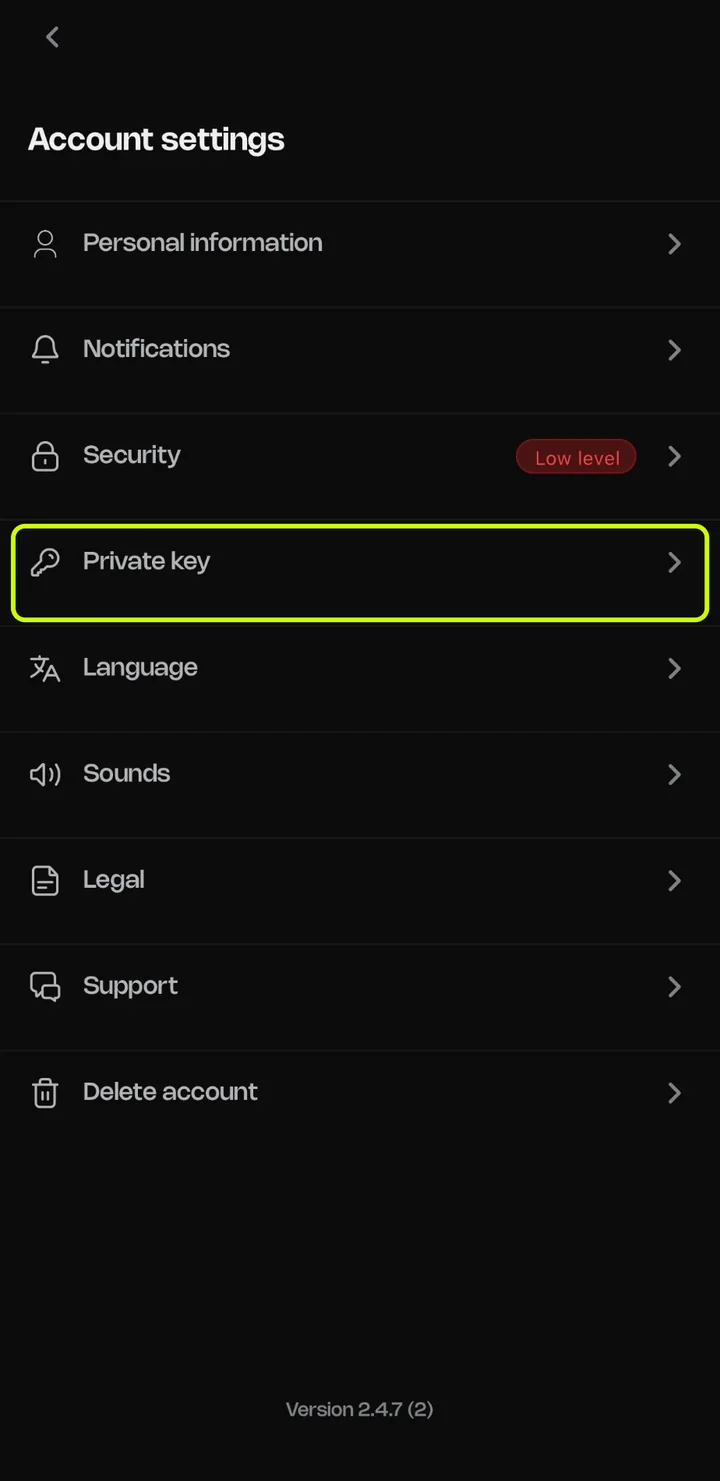
1Open the Profile tab, tap Account settings, then Private key.
-
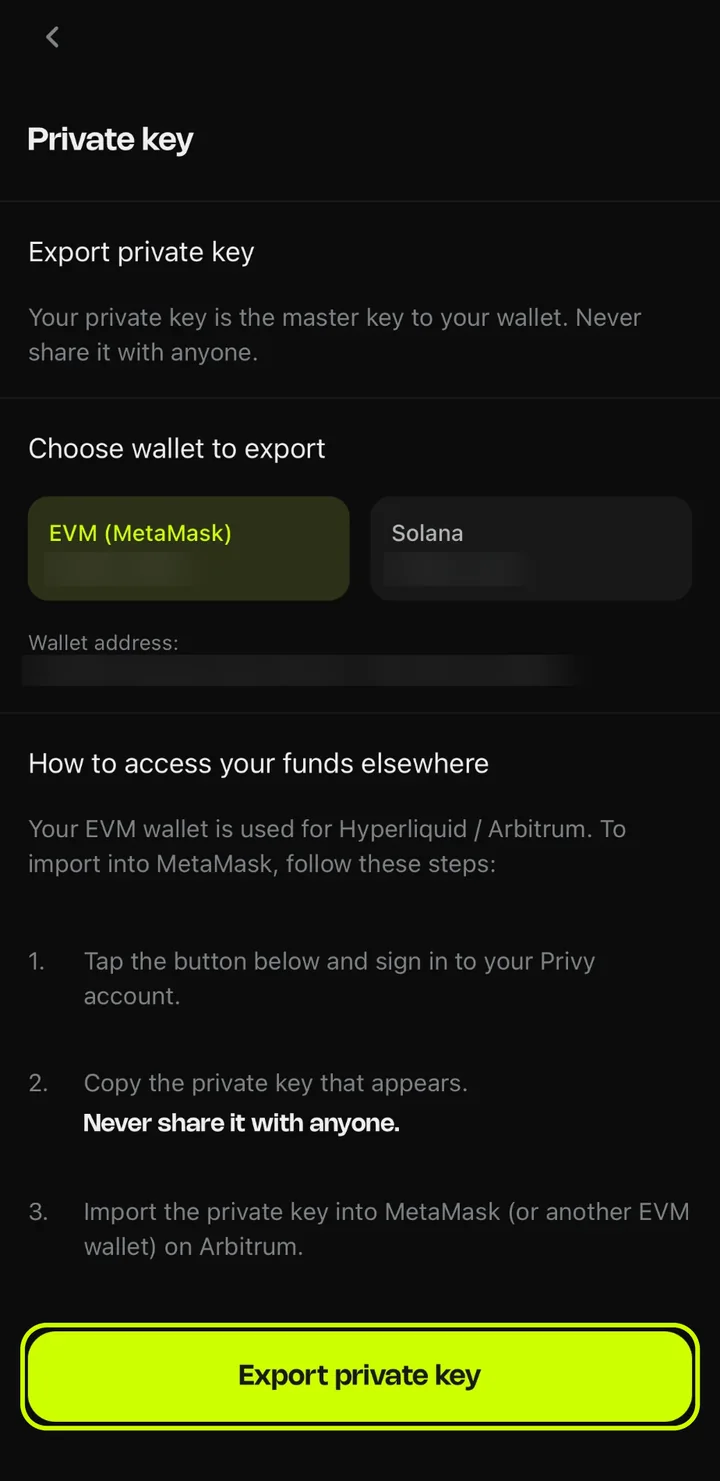
2Choose the wallet to export (EVM or Solana), tap Export private key, and sign in to Privy to reveal the key.
Your EVM wallet is the one Notch uses for Hyperliquid and Arbitrum. To use it elsewhere, import the key into MetaMask or another EVM wallet on Arbitrum.
Questions
Email support@notch.win.